It has been one very, very long day, but I think it is safe to say, that I have finished correcting the colours for Jay and Kay Save the World.
Eight days, not bad. Still, I will go over the corrections once again tomorrow to make sure everything is to my liking. I need a little time out just to make sure everything is constant throughout the film, with no sudden changes or blips in the lighting levels. But for now, I am going to leave this computer for a bit. It has driven me nutty, sitting here all day long!
Showing posts with label editing. Show all posts
Showing posts with label editing. Show all posts
Tuesday, 16 June 2009

Thursday, 4 June 2009
Countries El Director loves
As can be seen on my own blog, I love traveling. Having come through India, it is clear that if it was not for the joys of filming, my home would be on the road, somewhere, somehow. It is also quite clear that I love India. There is no one country that I have hated while traveling, but what countries do I truly love, alongside India?
1) America. I love the USA! It is a country that you can have fun in. Yes, many people may disagree with its policies, but man I absolutely love this country! And it is a vast land, with so much to offer the visitor. If you have never done America, then do it!
2) France. I love France! I love the people (wonderful), I love the food (fantastic), I love the society (relaxed). You do not have to speak that much French to get a response, the people appreciate the effort rather than an 'argy-bargy' of English. Also it is another vast country - what other country in the EU can boast of one of the most active volcanoes in the midst of the tropics?
3) Singapore. Oh yes, after hard traveling around Asia, Singapore is the perfect stop over destination. Clean, safe, efficient, relatively cheap with tropical weather and fantastic food. I love Singapore!
4) Mexico. While Mexico does have vast amounts of problems, it is a fascinating land, filled with an ancient history. Temples on every corner, deserts and forests, a beautiful coeastline. Another great place for foodies, I love Mexico!
5) Seychelles. Yes, I am a Seychelllois, but that does not mean I am bias. I too can see the faults in this little island (mainly the incompetents who run the country), but it is still a paradise. Great food, great weather, great women - what more would I want from a country? I love the Seychelles and I am proud to be a citizen of these islands!
There are no countries that I truly hate in this world, nor are their countries that I would never rule out. However, there are parts of the world that I have to give a little warning about, due to my own experiences. Each of these places I would love to visit again, but not without a major change in the circumstance of the country or in my own self. They are:
1) Kazakhstan - A stunning country with some of the most beautiful women around. Also very friendly locals who are some of the most fun you can ever have. This is tempered by officials who will attempt to steal from you at every corner. This is not just bribery and corruption, but highway robbery. It makes Kazakhstan a shitty place.
2) Sri Lanka - I love my father's country, and I can easily say that it is one of the most beautiful places on Earth. but wars make a land really shitty. And it has been one very brutal civil war. Like Seychelles, this has been ruined by politics, but in so much more, a nasty way.
3) UAE - Yep that's right, Dubai. I am not a big fan of the Gulf States, but the UAE takes the piss. If you are white, then enjoy it, but I am African/Asian. This is not a place for anyone with the slightest tan. While the African and Asian immigrants are a load of fun to hang out with, there is just a nasty feeling of ill will in the air. I have never been treated so badly due to the colour of my skin, and I have traveled in Salisbury. These guys had the money to build paradise, but they could not even build a cheap imitation of suburban USA. Awful.
1) America. I love the USA! It is a country that you can have fun in. Yes, many people may disagree with its policies, but man I absolutely love this country! And it is a vast land, with so much to offer the visitor. If you have never done America, then do it!
2) France. I love France! I love the people (wonderful), I love the food (fantastic), I love the society (relaxed). You do not have to speak that much French to get a response, the people appreciate the effort rather than an 'argy-bargy' of English. Also it is another vast country - what other country in the EU can boast of one of the most active volcanoes in the midst of the tropics?
3) Singapore. Oh yes, after hard traveling around Asia, Singapore is the perfect stop over destination. Clean, safe, efficient, relatively cheap with tropical weather and fantastic food. I love Singapore!
4) Mexico. While Mexico does have vast amounts of problems, it is a fascinating land, filled with an ancient history. Temples on every corner, deserts and forests, a beautiful coeastline. Another great place for foodies, I love Mexico!
5) Seychelles. Yes, I am a Seychelllois, but that does not mean I am bias. I too can see the faults in this little island (mainly the incompetents who run the country), but it is still a paradise. Great food, great weather, great women - what more would I want from a country? I love the Seychelles and I am proud to be a citizen of these islands!
There are no countries that I truly hate in this world, nor are their countries that I would never rule out. However, there are parts of the world that I have to give a little warning about, due to my own experiences. Each of these places I would love to visit again, but not without a major change in the circumstance of the country or in my own self. They are:
1) Kazakhstan - A stunning country with some of the most beautiful women around. Also very friendly locals who are some of the most fun you can ever have. This is tempered by officials who will attempt to steal from you at every corner. This is not just bribery and corruption, but highway robbery. It makes Kazakhstan a shitty place.
2) Sri Lanka - I love my father's country, and I can easily say that it is one of the most beautiful places on Earth. but wars make a land really shitty. And it has been one very brutal civil war. Like Seychelles, this has been ruined by politics, but in so much more, a nasty way.
3) UAE - Yep that's right, Dubai. I am not a big fan of the Gulf States, but the UAE takes the piss. If you are white, then enjoy it, but I am African/Asian. This is not a place for anyone with the slightest tan. While the African and Asian immigrants are a load of fun to hang out with, there is just a nasty feeling of ill will in the air. I have never been treated so badly due to the colour of my skin, and I have traveled in Salisbury. These guys had the money to build paradise, but they could not even build a cheap imitation of suburban USA. Awful.
Wednesday, 3 June 2009
Sound Editing - the continuation of pain
So I am currently bashing my head doing the sound editing for the CWP short, but what exactly does this editing involve?
Well, firstly, we have to get to how many of these effects are created. The bulk of my sounds have come from my computer. I have a piece of editing software that comes with a bundle of loops and other foleys which I can instantly plop into the edit and create my soundscape.
However, a lot of them is good old fashioned recording into a mic. And in this picture, taken from my sound editor you can see just that. The snap shot of the video in the picture shows NIck and myself busy recording sound straight into the camera via the boom mic. El Maestro looking on gravely while I try to do my best impersonation of Captain Goldtop.

But then comes the fun. Manipulating the voice of 'evil', the voice of the main bad guy, Captain Goldtop. How do you make him more wicked? After all, I am such a sweet sounding director, how could I possibly be the voice of evil ;)
And that is where the manipulation comes in. I distorted the clip, just a bit, to bring out the lower frequencies in my voice. Rendered it and then sent it back to the timeline to insert into the edit. Essentially, to sound bad, I just put on the bass and increased the funk – yeah baby!
Well, firstly, we have to get to how many of these effects are created. The bulk of my sounds have come from my computer. I have a piece of editing software that comes with a bundle of loops and other foleys which I can instantly plop into the edit and create my soundscape.
However, a lot of them is good old fashioned recording into a mic. And in this picture, taken from my sound editor you can see just that. The snap shot of the video in the picture shows NIck and myself busy recording sound straight into the camera via the boom mic. El Maestro looking on gravely while I try to do my best impersonation of Captain Goldtop.

But then comes the fun. Manipulating the voice of 'evil', the voice of the main bad guy, Captain Goldtop. How do you make him more wicked? After all, I am such a sweet sounding director, how could I possibly be the voice of evil ;)
And that is where the manipulation comes in. I distorted the clip, just a bit, to bring out the lower frequencies in my voice. Rendered it and then sent it back to the timeline to insert into the edit. Essentially, to sound bad, I just put on the bass and increased the funk – yeah baby!
Saturday, 30 May 2009
'Soundscaping'
First job, before you clean up the sound, sort out your edit. My soundtrack on an edit is normally all over the place. My mind can actually make sense of the mess, but seeing as I was about to correct the damn thing, it was a good idea to sort it out. So my Soundtrack went from this:

to this:

It may not look much different to the untrained eye and it does sound exactly the same, but there is now a logic to my sound cuts as a result of this.
And yes, this took me a whole day!

to this:

It may not look much different to the untrained eye and it does sound exactly the same, but there is now a logic to my sound cuts as a result of this.
And yes, this took me a whole day!
Friday, 8 May 2009
A significant milestone for El Director

This image could be one of the most important points along the road of Jay and Kay Save the World. For at long last, I have finished the editing. Five weeks after the final live action shooting days, along with a few re-shoots and voice overs the editing process has pretty much come to an end.
And yep, this film hits the ten minute mark including credits. That is a phenomenally huge short film. But for me, I have always viewed this project as a featurette, something which shows the potential of CWP as something more than a series of shorts. Hence the almost epic lengths I am so far tackling.
But this does not mean that the post production sequence is finished. Next comes the colour correction and just as importantly the cleaning up of the soundtrack.
In the editing process I get the final picture that I want, the pace of the film and the sound at an appropriate level. For the colour correction, I had a little life into the picture quality and in the sound correction, I smooth out the bumps and clean up the background static that is prevalent in the recording process. That is going to be a hard task, but it is something I will do after my holiday...
Monday, 4 May 2009
Half a Second of Pain
Ten bloody frames!

Do not even ask why ten frames means so much, but in layman's terms, that is less than half a second. That is it, and I have to rejig the whole bloody scene!
Grrr!

Do not even ask why ten frames means so much, but in layman's terms, that is less than half a second. That is it, and I have to rejig the whole bloody scene!
Grrr!
Friday, 24 April 2009
Friday...
It may be only 25 seconds, but that 25 seconds could be the difference between a lively response or the kiss of death for my short film.
There are many reasons why I cut finely. An 25 seconds is not a lot, but in a short film of just over ten minutes it makes a hell of a lot of difference.
I was told while doing music GSCE that art is really simple. Make sure there is a good beginning and a good ending and the rest will pretty much follow. Jolt up the audience and let them leave you thinking and entertained. You see, even high brow classical arts have that ethos.
Time will tell if I have learnt. But that is one hell of a chunk out of the short...
There are many reasons why I cut finely. An 25 seconds is not a lot, but in a short film of just over ten minutes it makes a hell of a lot of difference.
I was told while doing music GSCE that art is really simple. Make sure there is a good beginning and a good ending and the rest will pretty much follow. Jolt up the audience and let them leave you thinking and entertained. You see, even high brow classical arts have that ethos.
Time will tell if I have learnt. But that is one hell of a chunk out of the short...
Thursday, 23 April 2009
80% there...
It is exhausting and this week has had a lack of sleep as a result, but I would say that I am 80% of the way on the edit. By next week, I should hit the 100% mark, then comes sorting out the sound. Then (even more evil) the colour correction and the sound clean up. but for now, I am 80% happy with the picture, and that is a pretty good milestone...
Friday, 17 April 2009
The Rules of Editing
1) If something bugs you, then chop it.
Bad lighting? Wooden acting? Incoherent dialogue? Just chop it out.
2) The bigger the problem, the slicker the cut.
Let us say, that no matter how many takes, you have not got the sequence of events that you need. Well, slick cuts suddenly drop in, and make the picture look fine. Trust me.
3) Encourage your supporting actors.
Often on a film set, you concentrate on the main cast. However, this focus often makes them spoilt and inept. However, the supporting actors, often having no focus on them during the shoot will often outshine the main cast in order to garner the attention of the audience. In the editing, it is these players that come into their own and save a director's blushes.
(Remember that in Jay and Kay Save the World my supporting parts are played by a couple of inanimate milk bottles...)
4) Get music.
Music makes the edit better. Honest.
5) Chuck away the script.
The most important rule of editing. The script is a fluid concept. What looks good on paper and may have even entertained while on set, sometimes does not make it past the chopping room. The pace and rhythm of the piece is far more important than churning out dialogue.
Bad lighting? Wooden acting? Incoherent dialogue? Just chop it out.
2) The bigger the problem, the slicker the cut.
Let us say, that no matter how many takes, you have not got the sequence of events that you need. Well, slick cuts suddenly drop in, and make the picture look fine. Trust me.
3) Encourage your supporting actors.
Often on a film set, you concentrate on the main cast. However, this focus often makes them spoilt and inept. However, the supporting actors, often having no focus on them during the shoot will often outshine the main cast in order to garner the attention of the audience. In the editing, it is these players that come into their own and save a director's blushes.
(Remember that in Jay and Kay Save the World my supporting parts are played by a couple of inanimate milk bottles...)
4) Get music.
Music makes the edit better. Honest.
5) Chuck away the script.
The most important rule of editing. The script is a fluid concept. What looks good on paper and may have even entertained while on set, sometimes does not make it past the chopping room. The pace and rhythm of the piece is far more important than churning out dialogue.
Tuesday, 14 April 2009
Silvertop is coming to get you all!

Yes, this is currently where I am in the editing. Silvertop, attacking Kay as part of Goldtop's assault on our fair planet. That means, by the time I get to sleep, all I will have left to do is the dancing.
For shame on me, I got distracted by Sim City. Such is me, the king of procrastination. But it is coming El Maestro, the edit. It will be here and I will buzz you at a sane time this morning!
Sunday, 12 April 2009
One day left...
I have today and then tomorrow and then I have to make sure that El Maestro gets a copy of the first draft by Tuesday. Them I get to leave it in his hands, the film that is. Yep, that is it, after all the hard work on my part (ha!) and the effort on the part of the actors and crew (haha!) I, the director, gets to sit back and let the musician take care if it.
How come? Well, every good director knows that it is not your skill behind the camera, nor is it your skill with the actor's abilities that makes a good film. It is the musician that saves you.
And so come Tuesday, I might start to grow some hair again...
How come? Well, every good director knows that it is not your skill behind the camera, nor is it your skill with the actor's abilities that makes a good film. It is the musician that saves you.
And so come Tuesday, I might start to grow some hair again...
Saturday, 11 April 2009
Raring to edit?
Right, was wiped out by a 48 hour bug, but it looks as if the worse of it is behind me. Yesterday's blog was therefore a tad optimistic as I stated I was raring to go. In fact, I was fooling myself as I looked down the toilet bowl again with the spirit of gastric 'flu.
Right, now I have got tha off my chest (literally) I think it is time to get back to editing ;)
Right, now I have got tha off my chest (literally) I think it is time to get back to editing ;)
Friday, 10 April 2009
Raring through the Edit
All right guys, El D. here, just a brief blog today. Raring through the editing and should have got a first cut by Tuesday up and running. Then it is sent off to Nick who will start with the music to it, while I get back and start to finely cut it, frame by frame.
Hehe...
Hehe...
Friday, 3 April 2009
They Joys of Editing

So after two days of procrastination (that actually involved something relatively useful) I have finally begun the edit of 'Jay and Kay Save the World'. Now, I will go into the process of editing later on, but suffice to say, whatever destruction that I as a director have wrought on set, I get to fix the carnage in the editing suite.
Many directors believe in the craft of film making. I on the other hand depend on the deviousness of editing. Unlike a stage play, there is only one ultimate angle that I have to think about – that of the audience. So all those bad takes can be safely ignored, as long as I have already captured that one angle.
And that is where my problems begin! But, that story is for another day...
Friday, 27 February 2009
Post Production Blues or How to 'up' the DPI of your stills from 72 to 300
I am peeved off.
As a director, there are certain things I despise. One of them is a simple solution to a seemingly complex problem.
Note the following:

This is a sample of the rules I have to follow to enter a film festival. A seemingly simple proposition. To make sure my JPEG's have a resolution of 300 DPI. So I lift a few stills directly from the timeline of my editing suite.
And now I have this problem:
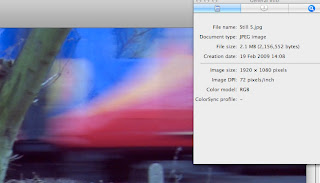
Yep, my stills read 72 DPI, despite the fact that the film was shot in HD.
Now, I'm racking my brains for a solution. I try tampering with the settings in my editing suite. I try different formats - PNG's, TIFF's, PICT's, anything! I try exporting Quicktime Stills, or anything else. I even try fiddling in Quicktime a completely different application Two whole days, I am banging my head.
The internet, normally the grapevine for such usefulness is basically hinting that I should buy an expensive photo editing suite - like hell I will!
So that is it, two day later, I am at a loss. Than in the corner of my eye, I spot a solution online:

I give it a try, and lo and behold, it works! Two frigging days for a relatively simple, if unorthodox procedure.
So, here is how you increase the DPI of your pictures so that it shows '300 dpi' instead of '72 dpi' to satisfy film festival regulations.
(If you follow the link, you will know for what operating system I am talking about, but like hell I will give those w**kers a direct plug by mentioning them in the blog).
---
1) Export the still from the editing timeline, in any 'still' format you want. I stuck to JPEG. Note that it will currently read '72 DPI' if you check the info of the file.
2) Open in Preview. Save as a PDF. Do not bother with any filters etc.
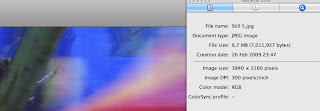
3) Open the PDF in Preview again. Save it as a JPEG. You will get the option to increase to the DPI, which is defaulted at 150 DPI. Type in 300 DPI.
4) You end up with exactly the same image, at the same dimensions, but now it satisfies the festival requirements and will read '300 DPI' when you check out the info for the file.
---
Now, I understand the festivals, why they want 300 DPI, as this is for their publicity, to make our films look good. What bugs me is that despite the multitudes you can spend on editing software, it does not do this automatically for you. I had to spend two days and follow an unrelated thread in order to find the solution to this problem.
After all, there are thousands of film makers, like myself out here in this world, who lift their stills off the editing time line and use it for their own publicity. Yet, the editing software, supposedly the 'one' that film makers use, the 'easy' option, cannot even export a JPEG to the standard dimensions demanded by film festivals.
For shame programmers - do you guys have a clue who your customers are?
As a director, there are certain things I despise. One of them is a simple solution to a seemingly complex problem.
Note the following:

This is a sample of the rules I have to follow to enter a film festival. A seemingly simple proposition. To make sure my JPEG's have a resolution of 300 DPI. So I lift a few stills directly from the timeline of my editing suite.
And now I have this problem:

Yep, my stills read 72 DPI, despite the fact that the film was shot in HD.
Now, I'm racking my brains for a solution. I try tampering with the settings in my editing suite. I try different formats - PNG's, TIFF's, PICT's, anything! I try exporting Quicktime Stills, or anything else. I even try fiddling in Quicktime a completely different application Two whole days, I am banging my head.
The internet, normally the grapevine for such usefulness is basically hinting that I should buy an expensive photo editing suite - like hell I will!
So that is it, two day later, I am at a loss. Than in the corner of my eye, I spot a solution online:

I give it a try, and lo and behold, it works! Two frigging days for a relatively simple, if unorthodox procedure.
So, here is how you increase the DPI of your pictures so that it shows '300 dpi' instead of '72 dpi' to satisfy film festival regulations.
(If you follow the link, you will know for what operating system I am talking about, but like hell I will give those w**kers a direct plug by mentioning them in the blog).
---
1) Export the still from the editing timeline, in any 'still' format you want. I stuck to JPEG. Note that it will currently read '72 DPI' if you check the info of the file.
2) Open in Preview. Save as a PDF. Do not bother with any filters etc.
3) Open the PDF in Preview again. Save it as a JPEG. You will get the option to increase to the DPI, which is defaulted at 150 DPI. Type in 300 DPI.
4) You end up with exactly the same image, at the same dimensions, but now it satisfies the festival requirements and will read '300 DPI' when you check out the info for the file.

---
Now, I understand the festivals, why they want 300 DPI, as this is for their publicity, to make our films look good. What bugs me is that despite the multitudes you can spend on editing software, it does not do this automatically for you. I had to spend two days and follow an unrelated thread in order to find the solution to this problem.
After all, there are thousands of film makers, like myself out here in this world, who lift their stills off the editing time line and use it for their own publicity. Yet, the editing software, supposedly the 'one' that film makers use, the 'easy' option, cannot even export a JPEG to the standard dimensions demanded by film festivals.
For shame programmers - do you guys have a clue who your customers are?
Thursday, 29 January 2009
The Colours Continue
Well, the 'tripping' correction is now over', so I am off to the world of subtlety and the second colour correction, an enhancement rather than a straight change of the colours within the film.
The reason I went tripping on the first colour correction was to test out all the tools available. Now, on this more subtle one, I will use correction to enhance and add a richness to the colours within the picture. So there will be no artificial additions (if the hedge is brown and leafless with bark, then it stays that way) but improvements in the true colours themselves (red seems to do particularly well when 'spiced up').
I admit to being a super geek...
The reason I went tripping on the first colour correction was to test out all the tools available. Now, on this more subtle one, I will use correction to enhance and add a richness to the colours within the picture. So there will be no artificial additions (if the hedge is brown and leafless with bark, then it stays that way) but improvements in the true colours themselves (red seems to do particularly well when 'spiced up').
I admit to being a super geek...
Saturday, 24 January 2009
Colour Correction
At the moment, the editing has finished, as that is really the easy bit. But...now comes the hard bit. Correcting the colour.
I am doing three different types of colour correction, seeing as it is my first time at attempting it. One is an unsubtle approach to correction, blatantly distorting the image to my desire. Second is ging to be a more subtle approach, and third (the most difficult) will be a subtle change from colour to as close to black and white as I can get. That is what I hope to be the final version of the ilm piece.
Anyways, for now, here is a little look at the 'non-subtle' version.
Before:

After:

I am doing three different types of colour correction, seeing as it is my first time at attempting it. One is an unsubtle approach to correction, blatantly distorting the image to my desire. Second is ging to be a more subtle approach, and third (the most difficult) will be a subtle change from colour to as close to black and white as I can get. That is what I hope to be the final version of the ilm piece.
Anyways, for now, here is a little look at the 'non-subtle' version.
Before:

After:

Friday, 9 January 2009
Shooting then Editing
Yesterday was one of those awful days of shooting. I will not go into the details, but I hate shooting before I go to work. I don't bloody like it! My mind is not on the more important job, instead it is on the cash provider...grr!
So, will be booking holiday in March (hopefully) so I can properly shoot Jay and Kay then.
Now, the edit...
So, will be booking holiday in March (hopefully) so I can properly shoot Jay and Kay then.
Now, the edit...
Monday, 1 September 2008
Shooting
Shooting is the essential part of the film making process. Obviously. And CWP has been shooting a lot recently. But now comes the editing. I have been falling behind recently and so today is going to be spent doing one thing...I better love my computer.
And my sleepy vlog from yesterday...
And my sleepy vlog from yesterday...
Subscribe to:
Posts (Atom)


 Posts
Posts


